So... for the 3rd time in 5 days, because they obviously don't deliver on the weekend, I get a failed delivery notification on my door. Same time every day, day after day. On the first day, I noticed the delivery notification said I can reschedule or arrange for a pickup through "Delivery Manager."
Sounds great. So, I go to the website, find out I have to make an account, and fill out the stupid form. Except, it won't let me put the last digit of my postal code in... because it's not a zipcode, and I live in Canada. No, it won't let me change the country to Canada either, despite the form having a very nice but quite non-functional country drop-down selection list. After futzing about for a while, I find out that Delivery Manager is only for US customers. So much for that.
And, next day, the next delivery notification. You think that someone delivering to a residential address would figure out that if a person isn't home during the first weekday at 9am, they probably aren't going to be home the next business day, at 9am. So... the form says 1st Attempt, 2nd Attempt, and Final Attempt. I figure, if I miss Saturday, at least I can go pick it up. No, they don't deliver on Saturday in Canada, apparently, despite what it says on the nice delivery notification, which should really be called the NO Delivery Notification.
So, on Monday, I get the Final Notification. But, no address of where I can pick it up. No information at all, actually. After more futzing around on their website, I find that they aren't going to leave it anywhere I can pick it up. They are going to keep trying for 10 days, presumably at exactly the time it's guaranteed that I won't be home to receive it, until they eventually give up and ship it back to where they picked it up. That's nice.
So, I try to get some customer support on their website. Nada. Page not Found, over and over again. Zero support. Nothing, unless you count broken links. So, you can imagine that I'm getting a little choked at this point. I hate phones.
So, I call the number on the delivery notification, cellphone on a pay as you go plan as I don't have a land-line. Haven't had a land line in a quarter century... I hate phones. But, I call, and I get the machine. It's useless, of course, so I ask to talk with a human. Surprisingly, I get one, but he can't help me because I'm in Canada. He has to transfer me to the International Support line. You think the delivery notifications in Canada would have a customer support number that works in Canada. I guess that's too hard for them to figure out.
So, I get transferred to the International Support line. And, surprisingly, she says she'll arrange for it to be held at some sorting facility that isn't on the FedEx website store locator. I have the address. I just have to wait for them to call me and let me know they have the package.
I'll let you know if they ever call.
Honestly, I'm rather annoyed with this experience. I tried to vent on their website, figured there would be some kind of complaint form, but nothing. All dead links, page not found. Makes a guy wonder how long it will be before it's "Company not Found." It's pretty hard to make Canada Post look quick and efficient, but FedEx somehow managed to do it.
Sorry, had to vent. If a stupid failing company can't even keep a website up enough to collect and trash complaint forms, then people will find other ways. Maybe the next person searching the web for 'FedEx' and 'Complaint' will find this blog. Misery loves company, after all.
Update:
So, after a few days, I get a garbled voice recording from a computer wanting me to go through a 3 minute customer satisfaction survey... on my pay as you go cellphone. I hung up... figuring that my expletive-riddled replies wouldn't be listened to anyway. On a chance, I decide to drive the 30 minutes out to the industrial area where the warehouse is. Apparently, they close for lunch, for a 2 hour lunch. Luckily, I'm there early so I buzz the door. Nothing. I buzz again, and I get a guy on the intercom. He buzzes me in and I get to this area with a big counter and nothing else. But, a guy walks in and hands me my package. Yay! Wasn't that fun?
And another Update:
Just read the news, 2017-07-21. FedEx is starting to shut down their Canadian operations. They say they'll still ship to Canada... Yeah right. Goodbye FedEx.
Sad to see all those people lose their jobs because of inanely stupid management decisions, but it was pretty obvious it was going to happen. The only other disgusting part is that those managers will likely get bonuses because of all the money they 'saved'.
Showing posts with label Review. Show all posts
Showing posts with label Review. Show all posts
2017-06-26


2012-01-31
CyberNav Mini Review
This is a review of the CyberNav Mini 5" Android-powered GPS tablet. Why am I writing this? Well, because I just bought one even though there were no reviews out on the web. Every page I found simply had the same sales brochure text on it, word for word. Very annoying. I decided to fix that for the next person. I'm going to break this review up into 3 parts. The first part will be my first-day impressions. Next, I'll write a 2-week synopsis. Finally, sometime when I've decided I've got all I'm going to get out of this thing, I'll write a wrap-up.
Caveats: First off, I'm no tablet expert. I use GPS quite a bit but for very specific purposes. I also have a Nokia N810 Internet Tablet, which I love. In fact, I love it so much I realized that if it ever broke, there would be a lot of things that I wouldn't be able to do. I realized that I needed a backup. There's nothing that will directly replace the N810 for me, but I thought this CyberNav Mini might replace some of the functions at least. Besides, it might make a decent cheap GPS to mount on my dual-purpose motorcycle and it will also allow me to explore the Android ecosystem, which I've been curious about. What this means is that I'm biased and my review is going to basically amount to a comparison with the N810. Take what you will from it. Nobody is paying me to do this, not even through the site adverts which, at the present rate, should net me my first $100 check in about 2018.
I'll not bother describing the published spec's as they're easy to find. Here are the points I first noticed:
That's it for now... stay tuned for part 2 mid February.
If you have any specific questions about it, leave a comment.
Update 1: just answering some comment questions
On my first trip to the woods, I fired up the CyberNav and it took it's sweet time getting a lock while I was walking around. Dense forest cover, stuff that would kill my older Garmins, but easily dealt with by the Dakota 20 I have (had - it died). So, good chip but the small antenna limits it a bit. It did lock; it did work. Overall, I'd say it's not bad. Once it gets a lock it seems quite good, very tenacious.
As for mapping apps:
The installed iGo with vector maps takes a bit of getting used to - drove my wife nuts while we were driving home as she couldn't figure out how to do anything. It does route, and auto-route again when you ignore it's directions. The speaker was loud enough to hear over a quiet stereo and the directions were understandable, unlike the N810 audio helper (my impression of the N810 voice was "kidnap victim in trunk of car with socks stuffed in mouth" - useless). No idea yet how the FM transmitter works, but I suppose that would negate listening to music... or maybe not... it's possible it's smart enough to do both but I'm not holding my breath on that. Android, at least v2.2, seems pretty anti-multitasking. I'll make a point of playing with the FM transmitter before the next review.
I've also been playing with the Orux mapping app. It's tile-based, a lot like the old Ozi Explorer that I used before the Garmin vector map editors got useful, before I started using Google Earth to view my tracks. In fact, I just converted my old Ozi maps into Orux format and uploaded them to the CyberNav. They seem to work quite well. So, now I have topo maps of Vancouver Island. Orux does have the ability to download and cache offline map tiles from a variety of sources, but they limit the download to 250MB per map. That's good for hiking in a park but not so great for off-roading. There is a utility call MOBAC (Mobile Atlas Creator, or something like that) which does allow as many tiles as you want per map, but the current version only supports Open Street Map (OSM). The previous version (1.8.x) supported a lot more sources, Google Maps etc., but they got shut down for license violation. You can still find the 1.8 version if you look for it. I'm using it now, as in right now, to cache from Microsoft Maps. Not sure if it will work yet. In any event, with the tile approach, there will always be a way to get decent maps - it's just a lot of work. Right now, I'm just bouncing around between things. It will take a while to find an effective work-flow for what I want to do. I know that, it's not really a CyberNav issue. Well, it would be nice if I could use the custom Garmin-format maps I've built. Haven't found a way to do that yet. Being a tablet rather than a dedicated GPS, it's entirely possible that this functionality will happen at some point. There are apps out there that do support Garmin vector maps.
One real CyberNav issue is that it is most definitely crashing, or something. It's not mechanical, no amount of twisting or tapping will make it shut down. It does seem to be something about the screen-lock or power-save mode. Very often, when I've left it on, with the USB charger connected or not, when I go to use it again by hitting the power button, the only way to get it out of it's blank-screen mode (the power button is the only button on this thing) it will reboot. It's never actually done this while I'm using it - so it's not an issue I'm fretting about. On vehicle-power while running a mapping app that keeps it awake, I don't see this reboot issue as causing any problems. I could be wrong though. I'll update when I know more.
(mini update: I turned off the screen blank and it ran on the USB charger for a couple of days straight. So, yeah, something to do with the power-save mode. It could be something as stupid as me not knowing the magic Android wakeup spell... it's only got that one button though)
(another mini update: Yeah, the "crashing" is just me being an Android newbee. First, returning from powersave mode involves hitting the power button and then WAITING for it. It takes a second or 2. If you don't wait and hold the power button down, it resets. Also, by design, Android shuts down after a defined period of time in powersave mode, 30 minutes by default with the CyberNav. Thus, it isn't crashing, it's just turning off. Nothing to see here, move along folks.)
Oh, battery life, so far, seems pretty consistent. 2 hours off the charger. That's about it. No idea how much standby time it gets as, as I've noted above, it's always off when I go to use it again. Unlike the N810, it doesn't take that long, or that much power, to boot back up though.
One more thing: the guy I bought it off of (if you can assume a masculine identity with "pumpkin_coolstore") says it's fine to link to his store. Thus, I'll assume the iGo maps are somewhat legit, or he doesn't care. I'm not saying this is the best place to buy but it worked well for me. The guy is very customs-savvy, if you know what I mean. Your results may vary.
Update 2: Sunlight and the Screen
I tried it today: Yay! Sun! ...for a few minutes anyway. Outside, the screen washed out completely in direct sunlight. In a side-by-side comparison between it and the N810, the N810 was clearly better. On the dash, the CyberNav was fine and the map always visible while driving around. On the dash, it also appeared brighter than the N810. Likely, the CyberNav has a stronger backlight but is missing that special something that makes the N810 screen better in direct sunlight. You do get what you pay for.
The screen washout might prove an issue with my plans to mount the CyberNav on my motorcycle. However, it shouldn't be that big a deal to shield it for a moment when necessary. Time will tell.
(mini update: Screen glare and washout in sunlight is significant and I nearly gave up trying to figure out how to deal with it. Even a sun-shade wasn't enough to make the map visible while riding. The final answer was, surprisingly, custom high-contrast maps. With those, the maps are visible while riding, even on a sunny day. The sun-shade makes them even better.)
Update 3: Two Weeks In
As a car GPS, unless you need the on-the-fly traffic updates that some dedicated units offer, I'd go with the CyberNav. The GPS is plenty good enough for car stuff, it comes with mounting hardware and power adaptors, and being an Android tablet the mapping options really are amazing. You have choice: see the OSM Mapping Apps list for a start, and that's just the ones that support Open Street Maps. I can't say I'm a fan of iGO, the app my CyberNav came with, but considering the options available I really don't care. I like options. Now, I've never owned or even used one of those dedicated car navigators so please take that into account when reading this review. I'm a back-country GPS user. On the road, well, I managed to circumnavigate North America on a road trip using a world map I got out of a cereal box, seriously. How good does a car GPS have to be?
I don't know how well the CyberNav will operate mounted on the handlebars of my Dual-sport bike, won't really know until spring. However, I've already identified a few mapping apps that look really good, Androzic being one of them as I'm an old OziExplorer users. I dumped my .ozf2 maps into the CyberNav and I'm already set to go, though I will remake these maps with my new routes edited into them. I'm hoping Maperitive will let me do that easily. For those that don't know, the Ozi .ozf2 format does zoom levels very, very well. While Orux supports Ozi maps, it doesn't support the .ozf2 image file format, which is too bad because it's great. Like I said, going with an Android tablet over a dedicated GPS offers a lot of choice, though choice does involve effort and compromise. If you don't like playing and just want directions to a hotel, the extra work might not be worth the effort.
As a walking GPS, I'd say the CyberNav is near useless and even the N810 is a significant improvement. With 2 hours of battery life and not being able to run the GPS while the screen is blanked, you're not going to get very far. If you wanted to mark your position in the parking lot, turn it off, and dump it in your pocket just in case, then it would be okay. It does fire up and find it's location fairly quickly and having that position might prove very, very useful. That's something my N810 fails at miserably as getting a fix can prove an exercise in patience. Then again, it's easy to swap batteries in the N810 and I carry a spare, something the CyberNav just can't do. I've needed that spare battery enough times to realize how much a problem not being able to swap would be. Power is the CyberNav's weakest point. Good in a car, okay to fire up for a quick fix, but if you want the CyberNav to keep the track of your hike, well, you better walk fast. It might be different if there was some secret power-save mode that doesn't reset the CyberNav just to wake up from. If I ever find that, I'll let you know.
Hardware-wise, the CyberNav is nothing to scream at, either way. The resistive screen works very well with a stylus but not so great with fingers. Funny thing was, it came with a shipping protector over the screen and I found fingers weren't that bad. Taking it off actually made finger-swipes harder. If I were a finger-swiping kind of guy, I think I'd be using screen protectors with it just to make the screen a little slipperier. On the other hand, being resistive, I'm hoping I can toss the thing in clear plastic on the bike to keep out the water. Can't do that with capacitive. I doubt fat-finger gloves will get me far so I'll likely have to rig up a stylus holder as well. I have no idea how well the hardware will hold up to the pounding and vibration on the bike. I've already killed 2 Garmin Etrex Legends that way. It's a pretty hostile environment; I don't ride slow and easy. The CyberNav has a much bigger screen and is a whole lot cheaper than the typical hiking GPS units I've used, so I'm willing to see how well it does. The only other hardware issue I've noticed is the CyberNav actually runs a little hot, even when off the USB charger, though it doesn't seem to be a problem. I don't think they worried too much about power management when they designed this thing.
I've done an at-home test with the FM transmitter and it does work. More surprising, Android allows the music player and the iGO app to run at the same time. Thus, it is possible that it will voice-over navigation directions while playing music from the device. I've not actually tried this yet. I'll update when I have. Please don't ask me to rate the audio quality... it's just not my thing. As far as I'm concerned, a car stereo is a device that drowns out the noise from things I haven't got around to fixing yet. A cheesy tablet transmitting FM over the power cable is fine by me.
(mini-update: Yes, it can play music and voice-over navigation from iGO while using the FM transmitter. It actually works quite well. I also found out this thing has a vibrator in it. It buzzes when the battery gets low. I can't think of any use for it, but it's there.)
This last part is more about Android 2.2 than the CyberNav itself. Then again, unless you're going to install something else, Android 2.2 is what you get. First off, I hate on-screen keyboards. The N810 blows the CyberNav out of the water for this very reason. Well, that and the other hardware keys. The lack of any real keys on the CyberNav makes a lot of things oddly difficult. No full-screen button, no zoom in/out, no screen lock. I never realized how useful those buttons were until I didn't have them. Then again, a decent operating system would make the lack of these buttons easier. Android 2.2 is not a decent operating system. Actually entering in text drove me nuts on the CyberNav until I figured out that I could add the Hackers Keyboard that actually had arrow keys. I mean, trying to put the cursor in the exact right position on a 5" screen with no recourse to moving it afterwards was very frustrating. Why anyone would ship a device OS without arrow keys stock? With the Hacker's Keyboard, life is a little easier, but I much prefer working with the N810 in this regard.
The CyberNav comes with a microSD card slot and I happened to have a spare. So, I threw it in. It didn't work, didn't recognize it at all, nothing. No format option either. So, I took it out and re-formatted it in my Linux desktop computer, formatted ext3 (Linux) because I'm that kind of guy. Nothing showed in the CyberNav, again. So, I reformatted it fat32 (DOS) and the CyberNav tried to mount it (mount being a Linux thing) and it just went straight to "safe to remove." That was helpful... I went around in circles for a while until I got the bright idea to format the SD card in an actual Windows machine. It worked fine in the CyberNav after that. So, while Android may have Linux roots, it's lost it's way. I mean, yes, Linux is down there somewhere, but it's buried under something that is not in the spirit of GNU/Linux.
I've used the N810 for several years and I've come to expect certain things from a mobile operating system, and Android doesn't have them. Android 2.2 is a little icky and I don't really like it. Power management is poor, the whole menu system is poor, notifications are poor, it's just clunky and everything -- as in the whole thing -- seems like an afterthought. I can sort of see why: it's designed to allow the screen to rotate, which makes either mode a compromise. It's designed to fit on much smaller screens than the 5" CyberNav, which is a compromise, and, well, it's all a compromise. I mean, on the N810 there's an app you can install that replaces the volume and backlight controls with a single tiny status icon, one that does screen rotation too. Tapping the wireless icon brings up all the wireless controls, like it should. The status bar in Android 2.2 has a bunch of icons that show status but do nothing when you tap them. Why do I have to dig down into the setup menu to find out the battery status? In Maemo, tapping the power status icon says "3 days standby, 7 hours use." You know, something useful. In Android, the volume controls take up half the bar, and then there's this big Media Refresh button, like that's something you need 20 times a day. It's just a big ugly waste of very precious space. I won't even get into multitasking and all the other things that an operating system should do, that Maemo does well and that Android just doesn't. I don't know, maybe the latest version of Android is a lot better. I hope so, because Maemo has been abandoned by Nokia and it's only chance for survival is a dedicated group of volunteer developers, and it blows Android 2.2 out of the water - there's no comparison.
Then, there's the Android Market. No doubt about it, there's an amazing selection of apps there. Finding them is an issue as the whole search function in the market seems designed to irritate the hell out of a person. I mean, who would design a search pane that shows previous searches but doesn't let you edit them before redoing them? What's the point? I search for "mapping" and get way too many hits. So, I hit the search button again and the search box is clear. Below it is a list of previous searches. At that point, you can type your search in again, "mapping vector" for example, or you can hit "mapping" below, and redo your search on mapping. Remember, this is all on a horrible virtual keyboard, no cnrl-c/v. The very notion of having a search box that lets you re-run previous searches without the ability to edit them pretty much sums up Android. It's just not finished, anywhere.
The N810 has a standard set of debian Linux package repositories. If you know Linux, these make perfect sense. They work via GUI or via terminal, like all things Linux. Maemo is Linux, not some obfuscated kernel buried under a half-baked GUI menu. These package repositories have a useful number of applications, mostly ones that have been ported from the standard Linux repositories. However, the choices are very limited in comparison to the Android market. Yes, near any Linux application could be ported to the N810, but it would have to be "hildonized," to work properly. Hildon being the actual desktop interface used by Maemo. This is possible to do but requires quite a skill-set. The result is that the applications that developer-type people want are all in the Maemo repositories, but other things can be scarce. So, yes, there's a certain amount of app-envy going on, even if Maemo is better overall. If I could get an Android emulator for Maemo, I'd re-install the CyberNav straight away; no second thoughts. In part, I bought the CyberNav to see what Android was all about. I've seen... not impressed, but still want the apps so I'll use Android and deal with the lousy market to get them.
Another mini-update: Speaking of apps... the music player that the CyberNav comes with is absurdly frustrating, almost bizarrely frustrating. In the Android Market there are a lot of replacements. I picked "the Android Music Player" from JRTStudio. No idea if that's the best but it sure beats the stock one. Supposedly, it's a back-port of the OpenSource one that came with Honeycome.
The biggest problem is the screen. At first, it was impossible to see in daylight. Nothing, nadda, just washed out glare. I tried not using any screen protector, I tried a sun screen, and I tried a lot of swearing. I almost gave up on the thing and relegated it to kid-toy status. But, in all my trials, I did notice one odd thing. While I couldn't see anything on the map, I could see the white application border. Ah, I thought, maybe high-contrast maps would help a little. Actually, they helped significantly, much more than expected, and more than enough to make the CyberNav useful in daylight. My kid's not happy that he lost his new toy but I have something I can play with.
Yes, with custom high-contrast mostly black and white maps with nice thick lines for roads and very little other details, the CyberNav screen is readable while mounted on the handlebars. At a glance, I can see the trail I'm on, I can see when the intersections are coming up, and, well, it's great. More than great, really, with that 5" screen it's the best I've ever had for riding.
I'm running it off a dollar-store cig-lighter to USB charger, basically the same as what the CyberNav came with. The intent, someday, is to wire the adapter right into the bike wiring harness, thus I didn't want to cut up the original, but I've not actually got there yet. It's just sitting there taped in place. Works fine.
I've got around 1000km of fairly aggressive trail riding on it and it seems to be holding up well. I fabricated a mount for it using rubber grommets to isolate vibration but I'm not entirely happy with the results - still too much buzzing. So far, the CyberNav has handled that without complaint but I expect there are internal connections that will have issues at some point. I may fab a better mount... maybe for the next tablet.
The screen seems to be holding up well even when being coated with dust then jabbed at and swiped by gloved hands while riding. I figured it would be a mess of scratches by now, what with no screen protector, but it still looks pretty good. I was concerned about using a resistive display rather than the tougher capacitive ones. But, the resistive display means that I don't have to futz around with trying to make conductive fingers on my gloves and it seems to be holding up well enough. My next tablet might just be resistive too.
I've been lucky so far in not having major rain events while riding. For the drizzle and soaked branches I've run into, the sun screen has provided more than adequate coverage. I figure, if it really, really starts to pour... the CyberNav can go in my pocket and I'll head home. I know where home is... don't need a navigator for that one. It's been splashed with mud while crashing through the bush behind other riders in a dualsport event. It's been pounded through the rough sections to the point where I was bottoming my suspension so hard I had to back off. It's lived the life of a dirtbiker, and it's been tough like one too. I am impressed.
The CyberNav can have issues while trying to get a location fix while under heavy tree cover and moving quickly. Being under heavy tree cover and moving quickly is a dirtbiker's natural habitat so that has caused a few missed sections on recorded tracks. Once it has a lock, it generally keeps it. But, there have been a few times where I had to stop in a clearing to let it find it's way. It's better than my old Garmin Etrek Legend was, but not as good as my Dakota 20. It's also cheaper than both by far so I can live with it's current performance.
It has crashed on me while riding a few times. (I've crashed on it a couple of times, so all's fair ) I don't know if it's the hardware, the OS, or the mapping application. I'm running Orux Maps and it's still rather fresh, so I'm not going to scream about stability problems. I've settled on Orux Maps after a lot of searching. Orux is very, very customizable. It is so customizable that, out of the box, it really doesn't come across that good. But, if you dig down and experiment, you can set it up to do amazing things. Stuff like hiding all the controls to give you a full screen of map, with the controls just a tap away. Nice big buttons if you want, or small. Everything seems to be adjustable... I'm even running my very own custom cursor. Orux rocks when you set it up right.
Orux is using a custom set of map tiles I've created from OSM data. That was a huge ordeal to get figured out. Editing OSM data via JOSM, to Maperitive with a custom rule-set to create the tiles, to MOBAC to make the Orux maps. Each program has a significant learning curve and everything has to be right to get what I wanted. However, that is now history. I've got it figured and I can make any kind of map I want with anything on it. I now have the maps I dreamed of while fighting in the Garmin world. All my data, all my regular routes, all the areas I've found on Google Earth and have marked for exploration. They're all there on the CyberNav screen as I crash through overgrown trails others have long forgotten about. That's the whole point of riding with a GPS mounted on the handlebars.
I am completely sold on using an Android tablet as a handlebar mounted GPS. There are issues with cheap hardware, the screen is not what I would prefer, but with the right maps it's more than good enough. It's better than anything I've run before. It's also very cheap. At this point, I don't really care if I kill the CyberNav in a year or so of riding. I'm so happy with the approach that I've already decided I'll be buying a new Android tablet every winter for the next few years. The old ones will get relegated to backup status, and eventually be that toy for my kid. The tablets are improving so fast that a yearly replacement seems the way to go. Rather than paying for the latest and greatest, just keep buying the current cheap model (last year's latest and greatest). If they die on the bike... oh well. If they live, like the CyberNav has, then I'll be even happier than I am now.
Update: Pictures!


Caveats: First off, I'm no tablet expert. I use GPS quite a bit but for very specific purposes. I also have a Nokia N810 Internet Tablet, which I love. In fact, I love it so much I realized that if it ever broke, there would be a lot of things that I wouldn't be able to do. I realized that I needed a backup. There's nothing that will directly replace the N810 for me, but I thought this CyberNav Mini might replace some of the functions at least. Besides, it might make a decent cheap GPS to mount on my dual-purpose motorcycle and it will also allow me to explore the Android ecosystem, which I've been curious about. What this means is that I'm biased and my review is going to basically amount to a comparison with the N810. Take what you will from it. Nobody is paying me to do this, not even through the site adverts which, at the present rate, should net me my first $100 check in about 2018.
I'll not bother describing the published spec's as they're easy to find. Here are the points I first noticed:
- It does have a tilt sensor. Actually, the level app I installed needed it switched to 'accelerometer' rather than tilt sensor. The level app seems to work okay, so I'm guessing the resolution isn't that bad. Nothing to compare it to, though, other than real levels. I certainly won't be using it to replace my precision machinist's level. It would be more than enough to hang a shelf with.
- The little cap on the top-right (opposite the power button) that looks like a stylus cap is not a stylus. The first thing I did was rip that off in the hopes that it was... had to glue it back on. Oh well.
- The resistive touch screen really works better with a stylus. The GPS mount comes with a tiny one... I've been using my spare N810. Overall, it seems quite precise. It is not multi-touch.
- The GPS is pretty good. I had to go outside for its very first fix, and that took a few minutes. But, overall, it seems to be reasonably sensitive. Not quite as good as my Garmin Dakota 20, but a lot better than the N810.
- I bought mine from an E-Bay reseller and it came with iGo maps. No idea if that's legit or not, so I'm not going to say exactly who I bought it from, but I appreciate the maps. The iGo app is pretty much a "get me to where I want to go" city navigator. Not much use for the likes of me that want to build custom maps, record tracks, and similar activities. OruxMaps, on the other hand, looks promising.
- Battery life, so far, seems to be about the published 2 hours of playing. With the N810, I can get 3 days standby, 6 hours of play, or about 3 hours of GPS. With the CyberNav, running the GPS doesn't seem to make that big a difference. However, this is still very tentative. I'll know better in a couple of weeks.
- Android, at least version 2.2, is not much to scream about compared to the N810's Maemo (debian Linux) OS. I've still not really got into it that far, but it seems to obfuscate rather than just give me control. Then again, I don't really know how to do anything in Android yet, so this too will have to wait for later reviews.
- The Android Market is both amazing and frustrating. Amazing, because it has many more apps than what is available for the N810. Frustrating, because most of them want internet access so they can deliver advertising. However, eventually I got smart and searched for 'opensource'. That gave about 20 pages of goodness.
That's it for now... stay tuned for part 2 mid February.
If you have any specific questions about it, leave a comment.
Update 1: just answering some comment questions
On my first trip to the woods, I fired up the CyberNav and it took it's sweet time getting a lock while I was walking around. Dense forest cover, stuff that would kill my older Garmins, but easily dealt with by the Dakota 20 I have (had - it died). So, good chip but the small antenna limits it a bit. It did lock; it did work. Overall, I'd say it's not bad. Once it gets a lock it seems quite good, very tenacious.
As for mapping apps:
The installed iGo with vector maps takes a bit of getting used to - drove my wife nuts while we were driving home as she couldn't figure out how to do anything. It does route, and auto-route again when you ignore it's directions. The speaker was loud enough to hear over a quiet stereo and the directions were understandable, unlike the N810 audio helper (my impression of the N810 voice was "kidnap victim in trunk of car with socks stuffed in mouth" - useless). No idea yet how the FM transmitter works, but I suppose that would negate listening to music... or maybe not... it's possible it's smart enough to do both but I'm not holding my breath on that. Android, at least v2.2, seems pretty anti-multitasking. I'll make a point of playing with the FM transmitter before the next review.
I've also been playing with the Orux mapping app. It's tile-based, a lot like the old Ozi Explorer that I used before the Garmin vector map editors got useful, before I started using Google Earth to view my tracks. In fact, I just converted my old Ozi maps into Orux format and uploaded them to the CyberNav. They seem to work quite well. So, now I have topo maps of Vancouver Island. Orux does have the ability to download and cache offline map tiles from a variety of sources, but they limit the download to 250MB per map. That's good for hiking in a park but not so great for off-roading. There is a utility call MOBAC (Mobile Atlas Creator, or something like that) which does allow as many tiles as you want per map, but the current version only supports Open Street Map (OSM). The previous version (1.8.x) supported a lot more sources, Google Maps etc., but they got shut down for license violation. You can still find the 1.8 version if you look for it. I'm using it now, as in right now, to cache from Microsoft Maps. Not sure if it will work yet. In any event, with the tile approach, there will always be a way to get decent maps - it's just a lot of work. Right now, I'm just bouncing around between things. It will take a while to find an effective work-flow for what I want to do. I know that, it's not really a CyberNav issue. Well, it would be nice if I could use the custom Garmin-format maps I've built. Haven't found a way to do that yet. Being a tablet rather than a dedicated GPS, it's entirely possible that this functionality will happen at some point. There are apps out there that do support Garmin vector maps.
One real CyberNav issue is that it is most definitely crashing, or something. It's not mechanical, no amount of twisting or tapping will make it shut down. It does seem to be something about the screen-lock or power-save mode. Very often, when I've left it on, with the USB charger connected or not, when I go to use it again by hitting the power button, the only way to get it out of it's blank-screen mode (the power button is the only button on this thing) it will reboot. It's never actually done this while I'm using it - so it's not an issue I'm fretting about. On vehicle-power while running a mapping app that keeps it awake, I don't see this reboot issue as causing any problems. I could be wrong though. I'll update when I know more.
(mini update: I turned off the screen blank and it ran on the USB charger for a couple of days straight. So, yeah, something to do with the power-save mode. It could be something as stupid as me not knowing the magic Android wakeup spell... it's only got that one button though)
(another mini update: Yeah, the "crashing" is just me being an Android newbee. First, returning from powersave mode involves hitting the power button and then WAITING for it. It takes a second or 2. If you don't wait and hold the power button down, it resets. Also, by design, Android shuts down after a defined period of time in powersave mode, 30 minutes by default with the CyberNav. Thus, it isn't crashing, it's just turning off. Nothing to see here, move along folks.)
Oh, battery life, so far, seems pretty consistent. 2 hours off the charger. That's about it. No idea how much standby time it gets as, as I've noted above, it's always off when I go to use it again. Unlike the N810, it doesn't take that long, or that much power, to boot back up though.
One more thing: the guy I bought it off of (if you can assume a masculine identity with "pumpkin_coolstore") says it's fine to link to his store. Thus, I'll assume the iGo maps are somewhat legit, or he doesn't care. I'm not saying this is the best place to buy but it worked well for me. The guy is very customs-savvy, if you know what I mean. Your results may vary.
Update 2: Sunlight and the Screen
I tried it today: Yay! Sun! ...for a few minutes anyway. Outside, the screen washed out completely in direct sunlight. In a side-by-side comparison between it and the N810, the N810 was clearly better. On the dash, the CyberNav was fine and the map always visible while driving around. On the dash, it also appeared brighter than the N810. Likely, the CyberNav has a stronger backlight but is missing that special something that makes the N810 screen better in direct sunlight. You do get what you pay for.
The screen washout might prove an issue with my plans to mount the CyberNav on my motorcycle. However, it shouldn't be that big a deal to shield it for a moment when necessary. Time will tell.
(mini update: Screen glare and washout in sunlight is significant and I nearly gave up trying to figure out how to deal with it. Even a sun-shade wasn't enough to make the map visible while riding. The final answer was, surprisingly, custom high-contrast maps. With those, the maps are visible while riding, even on a sunny day. The sun-shade makes them even better.)
Update 3: Two Weeks In
As a car GPS, unless you need the on-the-fly traffic updates that some dedicated units offer, I'd go with the CyberNav. The GPS is plenty good enough for car stuff, it comes with mounting hardware and power adaptors, and being an Android tablet the mapping options really are amazing. You have choice: see the OSM Mapping Apps list for a start, and that's just the ones that support Open Street Maps. I can't say I'm a fan of iGO, the app my CyberNav came with, but considering the options available I really don't care. I like options. Now, I've never owned or even used one of those dedicated car navigators so please take that into account when reading this review. I'm a back-country GPS user. On the road, well, I managed to circumnavigate North America on a road trip using a world map I got out of a cereal box, seriously. How good does a car GPS have to be?
I don't know how well the CyberNav will operate mounted on the handlebars of my Dual-sport bike, won't really know until spring. However, I've already identified a few mapping apps that look really good, Androzic being one of them as I'm an old OziExplorer users. I dumped my .ozf2 maps into the CyberNav and I'm already set to go, though I will remake these maps with my new routes edited into them. I'm hoping Maperitive will let me do that easily. For those that don't know, the Ozi .ozf2 format does zoom levels very, very well. While Orux supports Ozi maps, it doesn't support the .ozf2 image file format, which is too bad because it's great. Like I said, going with an Android tablet over a dedicated GPS offers a lot of choice, though choice does involve effort and compromise. If you don't like playing and just want directions to a hotel, the extra work might not be worth the effort.
As a walking GPS, I'd say the CyberNav is near useless and even the N810 is a significant improvement. With 2 hours of battery life and not being able to run the GPS while the screen is blanked, you're not going to get very far. If you wanted to mark your position in the parking lot, turn it off, and dump it in your pocket just in case, then it would be okay. It does fire up and find it's location fairly quickly and having that position might prove very, very useful. That's something my N810 fails at miserably as getting a fix can prove an exercise in patience. Then again, it's easy to swap batteries in the N810 and I carry a spare, something the CyberNav just can't do. I've needed that spare battery enough times to realize how much a problem not being able to swap would be. Power is the CyberNav's weakest point. Good in a car, okay to fire up for a quick fix, but if you want the CyberNav to keep the track of your hike, well, you better walk fast. It might be different if there was some secret power-save mode that doesn't reset the CyberNav just to wake up from. If I ever find that, I'll let you know.
Hardware-wise, the CyberNav is nothing to scream at, either way. The resistive screen works very well with a stylus but not so great with fingers. Funny thing was, it came with a shipping protector over the screen and I found fingers weren't that bad. Taking it off actually made finger-swipes harder. If I were a finger-swiping kind of guy, I think I'd be using screen protectors with it just to make the screen a little slipperier. On the other hand, being resistive, I'm hoping I can toss the thing in clear plastic on the bike to keep out the water. Can't do that with capacitive. I doubt fat-finger gloves will get me far so I'll likely have to rig up a stylus holder as well. I have no idea how well the hardware will hold up to the pounding and vibration on the bike. I've already killed 2 Garmin Etrex Legends that way. It's a pretty hostile environment; I don't ride slow and easy. The CyberNav has a much bigger screen and is a whole lot cheaper than the typical hiking GPS units I've used, so I'm willing to see how well it does. The only other hardware issue I've noticed is the CyberNav actually runs a little hot, even when off the USB charger, though it doesn't seem to be a problem. I don't think they worried too much about power management when they designed this thing.
I've done an at-home test with the FM transmitter and it does work. More surprising, Android allows the music player and the iGO app to run at the same time. Thus, it is possible that it will voice-over navigation directions while playing music from the device. I've not actually tried this yet. I'll update when I have. Please don't ask me to rate the audio quality... it's just not my thing. As far as I'm concerned, a car stereo is a device that drowns out the noise from things I haven't got around to fixing yet. A cheesy tablet transmitting FM over the power cable is fine by me.
(mini-update: Yes, it can play music and voice-over navigation from iGO while using the FM transmitter. It actually works quite well. I also found out this thing has a vibrator in it. It buzzes when the battery gets low. I can't think of any use for it, but it's there.)
This last part is more about Android 2.2 than the CyberNav itself. Then again, unless you're going to install something else, Android 2.2 is what you get. First off, I hate on-screen keyboards. The N810 blows the CyberNav out of the water for this very reason. Well, that and the other hardware keys. The lack of any real keys on the CyberNav makes a lot of things oddly difficult. No full-screen button, no zoom in/out, no screen lock. I never realized how useful those buttons were until I didn't have them. Then again, a decent operating system would make the lack of these buttons easier. Android 2.2 is not a decent operating system. Actually entering in text drove me nuts on the CyberNav until I figured out that I could add the Hackers Keyboard that actually had arrow keys. I mean, trying to put the cursor in the exact right position on a 5" screen with no recourse to moving it afterwards was very frustrating. Why anyone would ship a device OS without arrow keys stock? With the Hacker's Keyboard, life is a little easier, but I much prefer working with the N810 in this regard.
The CyberNav comes with a microSD card slot and I happened to have a spare. So, I threw it in. It didn't work, didn't recognize it at all, nothing. No format option either. So, I took it out and re-formatted it in my Linux desktop computer, formatted ext3 (Linux) because I'm that kind of guy. Nothing showed in the CyberNav, again. So, I reformatted it fat32 (DOS) and the CyberNav tried to mount it (mount being a Linux thing) and it just went straight to "safe to remove." That was helpful... I went around in circles for a while until I got the bright idea to format the SD card in an actual Windows machine. It worked fine in the CyberNav after that. So, while Android may have Linux roots, it's lost it's way. I mean, yes, Linux is down there somewhere, but it's buried under something that is not in the spirit of GNU/Linux.
I've used the N810 for several years and I've come to expect certain things from a mobile operating system, and Android doesn't have them. Android 2.2 is a little icky and I don't really like it. Power management is poor, the whole menu system is poor, notifications are poor, it's just clunky and everything -- as in the whole thing -- seems like an afterthought. I can sort of see why: it's designed to allow the screen to rotate, which makes either mode a compromise. It's designed to fit on much smaller screens than the 5" CyberNav, which is a compromise, and, well, it's all a compromise. I mean, on the N810 there's an app you can install that replaces the volume and backlight controls with a single tiny status icon, one that does screen rotation too. Tapping the wireless icon brings up all the wireless controls, like it should. The status bar in Android 2.2 has a bunch of icons that show status but do nothing when you tap them. Why do I have to dig down into the setup menu to find out the battery status? In Maemo, tapping the power status icon says "3 days standby, 7 hours use." You know, something useful. In Android, the volume controls take up half the bar, and then there's this big Media Refresh button, like that's something you need 20 times a day. It's just a big ugly waste of very precious space. I won't even get into multitasking and all the other things that an operating system should do, that Maemo does well and that Android just doesn't. I don't know, maybe the latest version of Android is a lot better. I hope so, because Maemo has been abandoned by Nokia and it's only chance for survival is a dedicated group of volunteer developers, and it blows Android 2.2 out of the water - there's no comparison.
Then, there's the Android Market. No doubt about it, there's an amazing selection of apps there. Finding them is an issue as the whole search function in the market seems designed to irritate the hell out of a person. I mean, who would design a search pane that shows previous searches but doesn't let you edit them before redoing them? What's the point? I search for "mapping" and get way too many hits. So, I hit the search button again and the search box is clear. Below it is a list of previous searches. At that point, you can type your search in again, "mapping vector" for example, or you can hit "mapping" below, and redo your search on mapping. Remember, this is all on a horrible virtual keyboard, no cnrl-c/v. The very notion of having a search box that lets you re-run previous searches without the ability to edit them pretty much sums up Android. It's just not finished, anywhere.
The N810 has a standard set of debian Linux package repositories. If you know Linux, these make perfect sense. They work via GUI or via terminal, like all things Linux. Maemo is Linux, not some obfuscated kernel buried under a half-baked GUI menu. These package repositories have a useful number of applications, mostly ones that have been ported from the standard Linux repositories. However, the choices are very limited in comparison to the Android market. Yes, near any Linux application could be ported to the N810, but it would have to be "hildonized," to work properly. Hildon being the actual desktop interface used by Maemo. This is possible to do but requires quite a skill-set. The result is that the applications that developer-type people want are all in the Maemo repositories, but other things can be scarce. So, yes, there's a certain amount of app-envy going on, even if Maemo is better overall. If I could get an Android emulator for Maemo, I'd re-install the CyberNav straight away; no second thoughts. In part, I bought the CyberNav to see what Android was all about. I've seen... not impressed, but still want the apps so I'll use Android and deal with the lousy market to get them.
Another mini-update: Speaking of apps... the music player that the CyberNav comes with is absurdly frustrating, almost bizarrely frustrating. In the Android Market there are a lot of replacements. I picked "the Android Music Player" from JRTStudio. No idea if that's the best but it sure beats the stock one. Supposedly, it's a back-port of the OpenSource one that came with Honeycome.
Update 4: The Wrap-Up
I quite like having the CyberNav mounted on the handlebars of my dualsport motorcycle. It was not without issues in the beginning, but it's great now that I've worked out the kinks.The biggest problem is the screen. At first, it was impossible to see in daylight. Nothing, nadda, just washed out glare. I tried not using any screen protector, I tried a sun screen, and I tried a lot of swearing. I almost gave up on the thing and relegated it to kid-toy status. But, in all my trials, I did notice one odd thing. While I couldn't see anything on the map, I could see the white application border. Ah, I thought, maybe high-contrast maps would help a little. Actually, they helped significantly, much more than expected, and more than enough to make the CyberNav useful in daylight. My kid's not happy that he lost his new toy but I have something I can play with.
Yes, with custom high-contrast mostly black and white maps with nice thick lines for roads and very little other details, the CyberNav screen is readable while mounted on the handlebars. At a glance, I can see the trail I'm on, I can see when the intersections are coming up, and, well, it's great. More than great, really, with that 5" screen it's the best I've ever had for riding.
I'm running it off a dollar-store cig-lighter to USB charger, basically the same as what the CyberNav came with. The intent, someday, is to wire the adapter right into the bike wiring harness, thus I didn't want to cut up the original, but I've not actually got there yet. It's just sitting there taped in place. Works fine.
I've got around 1000km of fairly aggressive trail riding on it and it seems to be holding up well. I fabricated a mount for it using rubber grommets to isolate vibration but I'm not entirely happy with the results - still too much buzzing. So far, the CyberNav has handled that without complaint but I expect there are internal connections that will have issues at some point. I may fab a better mount... maybe for the next tablet.
The screen seems to be holding up well even when being coated with dust then jabbed at and swiped by gloved hands while riding. I figured it would be a mess of scratches by now, what with no screen protector, but it still looks pretty good. I was concerned about using a resistive display rather than the tougher capacitive ones. But, the resistive display means that I don't have to futz around with trying to make conductive fingers on my gloves and it seems to be holding up well enough. My next tablet might just be resistive too.
I've been lucky so far in not having major rain events while riding. For the drizzle and soaked branches I've run into, the sun screen has provided more than adequate coverage. I figure, if it really, really starts to pour... the CyberNav can go in my pocket and I'll head home. I know where home is... don't need a navigator for that one. It's been splashed with mud while crashing through the bush behind other riders in a dualsport event. It's been pounded through the rough sections to the point where I was bottoming my suspension so hard I had to back off. It's lived the life of a dirtbiker, and it's been tough like one too. I am impressed.
The CyberNav can have issues while trying to get a location fix while under heavy tree cover and moving quickly. Being under heavy tree cover and moving quickly is a dirtbiker's natural habitat so that has caused a few missed sections on recorded tracks. Once it has a lock, it generally keeps it. But, there have been a few times where I had to stop in a clearing to let it find it's way. It's better than my old Garmin Etrek Legend was, but not as good as my Dakota 20. It's also cheaper than both by far so I can live with it's current performance.
It has crashed on me while riding a few times. (I've crashed on it a couple of times, so all's fair ) I don't know if it's the hardware, the OS, or the mapping application. I'm running Orux Maps and it's still rather fresh, so I'm not going to scream about stability problems. I've settled on Orux Maps after a lot of searching. Orux is very, very customizable. It is so customizable that, out of the box, it really doesn't come across that good. But, if you dig down and experiment, you can set it up to do amazing things. Stuff like hiding all the controls to give you a full screen of map, with the controls just a tap away. Nice big buttons if you want, or small. Everything seems to be adjustable... I'm even running my very own custom cursor. Orux rocks when you set it up right.
Orux is using a custom set of map tiles I've created from OSM data. That was a huge ordeal to get figured out. Editing OSM data via JOSM, to Maperitive with a custom rule-set to create the tiles, to MOBAC to make the Orux maps. Each program has a significant learning curve and everything has to be right to get what I wanted. However, that is now history. I've got it figured and I can make any kind of map I want with anything on it. I now have the maps I dreamed of while fighting in the Garmin world. All my data, all my regular routes, all the areas I've found on Google Earth and have marked for exploration. They're all there on the CyberNav screen as I crash through overgrown trails others have long forgotten about. That's the whole point of riding with a GPS mounted on the handlebars.
I am completely sold on using an Android tablet as a handlebar mounted GPS. There are issues with cheap hardware, the screen is not what I would prefer, but with the right maps it's more than good enough. It's better than anything I've run before. It's also very cheap. At this point, I don't really care if I kill the CyberNav in a year or so of riding. I'm so happy with the approach that I've already decided I'll be buying a new Android tablet every winter for the next few years. The old ones will get relegated to backup status, and eventually be that toy for my kid. The tablets are improving so fast that a yearly replacement seems the way to go. Rather than paying for the latest and greatest, just keep buying the current cheap model (last year's latest and greatest). If they die on the bike... oh well. If they live, like the CyberNav has, then I'll be even happier than I am now.
Update: Pictures!
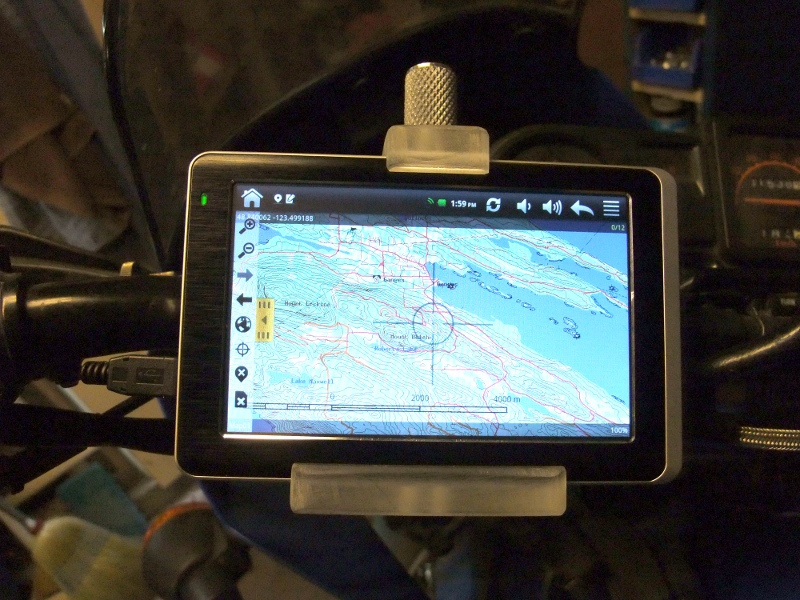
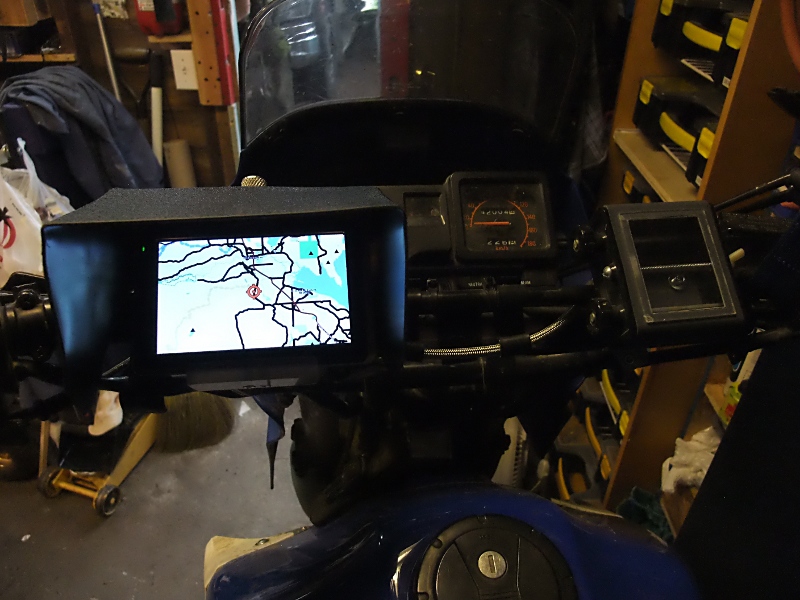
Another mini update: Nearly 2015 and the stupid thing is still working. No screen protector, no waterproof cover, mounted on the handlebar of a dirtbike being ridden by a crazy person, sometimes in sanctioned off-road races, in the pouring rain. 3 years of riding... It still works.
And another update... this thing rocks! So, the battery basically died. It would last maybe 5 min on a charge. Normally, I'm running it on my fully off-road dirtbike, powered with a $15 USB battery pack... spec'd at 30,000mah (yeah, right) but it runs the CyberNav for over 5 hours, which is longer than I can last crashing around in the bush. But, every once in a while, the battery pack shuts off, or the connector gets bumped, etc.. It's annoying as the CyberNav then shuts down. I like recording my tracks for later mapping and missing big chunks is annoying. So, I decided to replace the battery. I cracked it open, measured the existing battery, which was quite small, and the space that a battery could fit. Ebay price for a replacement was $20... hmmm... I've actually bought 3 of those 30,000mah battery packs, less than $20 each, and I know they have 4 batteries in them (because I'm the kind of guy that takes things apart for fun): 2 big, 2 small, all in parallel. The big one is exactly the max size that will fit in the CyberNav. Well, you can guess the rest. The CyberNav now runs for well over an hour again. Still works. Screen has a few scratches but nothing serious. Still mounted on the handlebars of my dirtbike... rain, dust, mud, lots of vibration, crashes... stupid thing must have been made by Timex.
2010-07-17
Midwives in BC - a review
I can't say I'm much of an expert in maternity. My wife, being from Japan, was rather ignorant of what having a baby in Canada involved as well. So, our first child was a bit of an adventure, and it started with our first choice, to decide between an OB/GYN or a Midwife.
I, being one of those self-declared rational people, had a decided preference for the established medical route. My wife had no idea... in Japan, expectant mothers picked the private maternity clinic that offers the perks and price that interests them. So, we got our referral to an OB/GYN, in 3 weeks. While waiting for this, as we walked past a Midwives office in our neighbourhood, we decided to see what that was all about.
Before we knew it, we were having our first appointment with our Midwife. We filled-out the paperwork, answered the questions, went for the blood tests... had our second appointment, got some great advice, got our questions answered, and everything was great. But, there was that OB/GYN appointment coming up. Our Midwife was most understanding and supportive, saying it was perfectly fine if we wanted to switch.
We went to see the OB/GYN, waited in the office for 20 minutes, and then met a wonderful person. She was obviously busy, but very supportive. We let her know that we had been seeing a Midwife but were undecided on which way to go. She let us know that under BC regulations we had to choose between the two, there was no going to both, but that she was okay with whatever we decided. Then, she went through the standard first meeting, filling out the paperwork, asking questions, requisitioning blood tests, just in case we decided to go with her. She was great.
However, the one thing that really struck my rational self was that the questions she asked were the same as the Midwife's, the blood tests she ordered had already been done with the Midwife. Everything was already in order, all the 'T's had been crossed. The Midwife and the OB/GYN were doing the same thing... they were both great. Well, this caused us some consternation. It would have been an easy choice if either the OB/GYN or the Midwife was clearly better, but they were both great, really great. Still, we had to choose.
While I still had a slight leaning towards the OB/GYN, mostly because we're a little older and the possibility of complications was higher, I left the choice to my wife. This was probably a mistake as she, being Japanese, wound up agonising about not wanting to offend either. She leaned towards the OB/GYN because she was referred by her GP, and she didn't want to offend the GP either. So... by the slightest of margins, the OB/GYN won out. My wife asked me to call and make an appointment.
I called the OB/GYN receptionist and we went back and forth searching for a time to come in. Best I could get was in about a month, and both my wife and I would have to book off time from work to make it. Now, for a couple expecting their first child, a month is a very, very long time away. So, making a manly command decision, I said "screw this" and convinced my wife to go with the Midwife. We could always switch later on if we felt it was necessary. She agreed. I called the Midwife receptionist and booked an appointment the following week. And, thus began our journey through maternity with our Midwife.
I'll skip the complete narrative on our appointments with our Midwife and instead say that any doubts I had about a Midwife being somehow less able to deal with complications were completely unfounded. Our baby was breech and we ended up going through what's called a Version, where a medical doctor tries to turn the baby from the outside. This didn't work and we had to go in for a scheduled C-section. The transitions in care, from Midwife to MD and back again, were seamless. Our Midwife was with us there in the operating room, and after, and had full hospital privileges. No one we met at the hospital expressed any concern about us having a Midwife instead of an OB/GYN, in fact they were all very supportive. We never, at any point, felt we were lacking in professional care, never.
We did, however, gain a lot by going with a Midwife instead of an OB/GYN. We've had hour-long appointments, un-rushed with plenty of time to discuss any concerns we had. We've had easy appointment bookings that fit our busy lives. We've had frequent in-hospital visits after the delivery to help with breastfeeding and any other concerns. We've had several at-home visits after delivery. And, there's the follow-up appointments for 6 weeks after deliver too. Our Midwife has been great, more than great actually. Both my wife and I have relied on our Midwife to not only have a child, but to transition into becoming parents. This is no small thing and I couldn't imagine going through this process without her. If we ever decide to have another child, I would not even consider going through it without a Midwife.
Thus, through more chance than intelligent choice, my wife and I went through a pregnancy, through delivery, and now into parenthood with a Midwife. We consider ourselves to be very, very lucky. I write this now, with my healthy and happy son sleeping on my lap, as a recommendation to any other self-declared rational people that may be reading this. Don't worry about missing-out on professional care with a Midwife. They are professionals, fully integrated into the BC medical system, and the enhanced support they provide is exactly what you're going to need.
I, being one of those self-declared rational people, had a decided preference for the established medical route. My wife had no idea... in Japan, expectant mothers picked the private maternity clinic that offers the perks and price that interests them. So, we got our referral to an OB/GYN, in 3 weeks. While waiting for this, as we walked past a Midwives office in our neighbourhood, we decided to see what that was all about.
Before we knew it, we were having our first appointment with our Midwife. We filled-out the paperwork, answered the questions, went for the blood tests... had our second appointment, got some great advice, got our questions answered, and everything was great. But, there was that OB/GYN appointment coming up. Our Midwife was most understanding and supportive, saying it was perfectly fine if we wanted to switch.
We went to see the OB/GYN, waited in the office for 20 minutes, and then met a wonderful person. She was obviously busy, but very supportive. We let her know that we had been seeing a Midwife but were undecided on which way to go. She let us know that under BC regulations we had to choose between the two, there was no going to both, but that she was okay with whatever we decided. Then, she went through the standard first meeting, filling out the paperwork, asking questions, requisitioning blood tests, just in case we decided to go with her. She was great.
However, the one thing that really struck my rational self was that the questions she asked were the same as the Midwife's, the blood tests she ordered had already been done with the Midwife. Everything was already in order, all the 'T's had been crossed. The Midwife and the OB/GYN were doing the same thing... they were both great. Well, this caused us some consternation. It would have been an easy choice if either the OB/GYN or the Midwife was clearly better, but they were both great, really great. Still, we had to choose.
While I still had a slight leaning towards the OB/GYN, mostly because we're a little older and the possibility of complications was higher, I left the choice to my wife. This was probably a mistake as she, being Japanese, wound up agonising about not wanting to offend either. She leaned towards the OB/GYN because she was referred by her GP, and she didn't want to offend the GP either. So... by the slightest of margins, the OB/GYN won out. My wife asked me to call and make an appointment.
I called the OB/GYN receptionist and we went back and forth searching for a time to come in. Best I could get was in about a month, and both my wife and I would have to book off time from work to make it. Now, for a couple expecting their first child, a month is a very, very long time away. So, making a manly command decision, I said "screw this" and convinced my wife to go with the Midwife. We could always switch later on if we felt it was necessary. She agreed. I called the Midwife receptionist and booked an appointment the following week. And, thus began our journey through maternity with our Midwife.
I'll skip the complete narrative on our appointments with our Midwife and instead say that any doubts I had about a Midwife being somehow less able to deal with complications were completely unfounded. Our baby was breech and we ended up going through what's called a Version, where a medical doctor tries to turn the baby from the outside. This didn't work and we had to go in for a scheduled C-section. The transitions in care, from Midwife to MD and back again, were seamless. Our Midwife was with us there in the operating room, and after, and had full hospital privileges. No one we met at the hospital expressed any concern about us having a Midwife instead of an OB/GYN, in fact they were all very supportive. We never, at any point, felt we were lacking in professional care, never.
We did, however, gain a lot by going with a Midwife instead of an OB/GYN. We've had hour-long appointments, un-rushed with plenty of time to discuss any concerns we had. We've had easy appointment bookings that fit our busy lives. We've had frequent in-hospital visits after the delivery to help with breastfeeding and any other concerns. We've had several at-home visits after delivery. And, there's the follow-up appointments for 6 weeks after deliver too. Our Midwife has been great, more than great actually. Both my wife and I have relied on our Midwife to not only have a child, but to transition into becoming parents. This is no small thing and I couldn't imagine going through this process without her. If we ever decide to have another child, I would not even consider going through it without a Midwife.
Thus, through more chance than intelligent choice, my wife and I went through a pregnancy, through delivery, and now into parenthood with a Midwife. We consider ourselves to be very, very lucky. I write this now, with my healthy and happy son sleeping on my lap, as a recommendation to any other self-declared rational people that may be reading this. Don't worry about missing-out on professional care with a Midwife. They are professionals, fully integrated into the BC medical system, and the enhanced support they provide is exactly what you're going to need.
2008-04-17
Bosch CS20XC Circular Saw Review
Disclaimer: I am rather annoyed with Bosch Tools right now - take this review as you may.
Quite some time ago, I bought a Bosch jigsaw. I was amazed at how good it was and I took it as an object lesson in "you get what you pay for." Up until then, my power-tool collection was a mishmash of whatever I could get cheap, and my old jigsaw was, well, crap. I almost never used it because it barely worked; the only time I pulled it out was when it was the only tool I had that could make the cut. Then, after I bought the Bosch jigsaw, I started using everywhere - it was the best power-tool I had. After that, I bought a Bosch dual-base router set and was just as pleased with how they worked. When I decided to replace my circular saw, Bosch was the natural choice. I picked the CS20XC, which I assume is the Canadian equivalent of the CS20. The CS20 has the detachable cord and the resin base, while the cheaper model, the CS10, has the fixed cord and metal base.
When I first looked at the Bosch circular saw, the first thing that struck me was the resin (tough plastic) base. If it had been on one of those cheap $49.99 saws, I wouldn't even have considered it. But, this was the high-end Bosch tool and I was willing to believe them. I figured, if they were going to put a resin base on their circular saw, well, they knew what they were doing and it would be better than the metal bases on all the other good saws. I trusted Bosch.
I should have gone with my original instincts; the resin base is crap. I shouldn't have trusted Bosch. Oh, it was okay at first. The saw is well balanced and operates smoothly. The detachable cord system is a really, really good idea. But, a while ago, the saw started to get hard to push through a cut. It wasn't the blade, it was the base. The base warped. The warped base makes the saw rock back and forth, gouging the work, and it is also making the base dig into the work rather than slide over top. It actually scratches the work along the left side while sliding along. Very, very annoying. Of course, my warranty had already expired.
So, with my recent experience in having my out-of-warranty Panasonic camera serviced for a dead CCD at no charge, and even having Panasonic pick up the return shipping, I was hoping that Bosch too would stand behind their products. Nope.
I sent a request to Bosch Canada... here's the response I got back:
...
Bosch is constantly trying to improve the power tool line and any
deficiency is looked after at all times. Your concerns are duly noted
and passed on to our quality control in USA. Thank you.
D Everett
Service Manager
Power Tool Division
Robert Bosch Canada Inc.
...
Needless to say, I'm not particularly overwhelmed that my concerns have been noted. I guess it's too much to expect a simple tool company to have the same tech-savvy that Panasonic showed in dealing with their CCD issue. But, in the world of Google, where a simple blog like this is available to anyone searching the web for reviews, Bosch is going to have to smarten-up. Bosch is in the business of selling their name, for a premium I might add. If they're not going to stand behind what they sell, they're asking too much.
If you have one of these with a warped base, leave a comment here.
Quite some time ago, I bought a Bosch jigsaw. I was amazed at how good it was and I took it as an object lesson in "you get what you pay for." Up until then, my power-tool collection was a mishmash of whatever I could get cheap, and my old jigsaw was, well, crap. I almost never used it because it barely worked; the only time I pulled it out was when it was the only tool I had that could make the cut. Then, after I bought the Bosch jigsaw, I started using everywhere - it was the best power-tool I had. After that, I bought a Bosch dual-base router set and was just as pleased with how they worked. When I decided to replace my circular saw, Bosch was the natural choice. I picked the CS20XC, which I assume is the Canadian equivalent of the CS20. The CS20 has the detachable cord and the resin base, while the cheaper model, the CS10, has the fixed cord and metal base.
When I first looked at the Bosch circular saw, the first thing that struck me was the resin (tough plastic) base. If it had been on one of those cheap $49.99 saws, I wouldn't even have considered it. But, this was the high-end Bosch tool and I was willing to believe them. I figured, if they were going to put a resin base on their circular saw, well, they knew what they were doing and it would be better than the metal bases on all the other good saws. I trusted Bosch.
I should have gone with my original instincts; the resin base is crap. I shouldn't have trusted Bosch. Oh, it was okay at first. The saw is well balanced and operates smoothly. The detachable cord system is a really, really good idea. But, a while ago, the saw started to get hard to push through a cut. It wasn't the blade, it was the base. The base warped. The warped base makes the saw rock back and forth, gouging the work, and it is also making the base dig into the work rather than slide over top. It actually scratches the work along the left side while sliding along. Very, very annoying. Of course, my warranty had already expired.
So, with my recent experience in having my out-of-warranty Panasonic camera serviced for a dead CCD at no charge, and even having Panasonic pick up the return shipping, I was hoping that Bosch too would stand behind their products. Nope.
I sent a request to Bosch Canada... here's the response I got back:
...
Bosch is constantly trying to improve the power tool line and any
deficiency is looked after at all times. Your concerns are duly noted
and passed on to our quality control in USA. Thank you.
D Everett
Service Manager
Power Tool Division
Robert Bosch Canada Inc.
...
Needless to say, I'm not particularly overwhelmed that my concerns have been noted. I guess it's too much to expect a simple tool company to have the same tech-savvy that Panasonic showed in dealing with their CCD issue. But, in the world of Google, where a simple blog like this is available to anyone searching the web for reviews, Bosch is going to have to smarten-up. Bosch is in the business of selling their name, for a premium I might add. If they're not going to stand behind what they sell, they're asking too much.
If you have one of these with a warped base, leave a comment here.
Subscribe to:
Posts (Atom)
